Overview
The Sandpiper keyboard is a custom USB keyboard designed to fit into the provided enclosure. Note: This PCB is optional and is not required to run Sandpiper—the system works with any standard USB keyboard.
Requirements
Software
- PCB Design: KiCad 9 or above
- Enclosure Design: SolidWorks (for modifications)
- Firmware Programming: AVRdude, AVRdudess, or QMK Toolbox
Hardware
- AVR programmer (for flashing firmware)
- 6-pin ISP header
PCB Manufacturing
The PCB can be manufactured through online services such as:
Important: When ordering, match the parts to the ones listed in the BOM as closely as possible. Mismatches in part numbers might result in wrong pin connections.
Firmware Programming
To program the keyboard firmware:
- Locate the firmware in the
firmware/folder of the sandpiper_pcb repository - Use an AVR programmer with AVRdude, AVRdudess, or QMK Toolbox to flash the firmware
- The programming header goes on the bottom side of the board where the chip sits
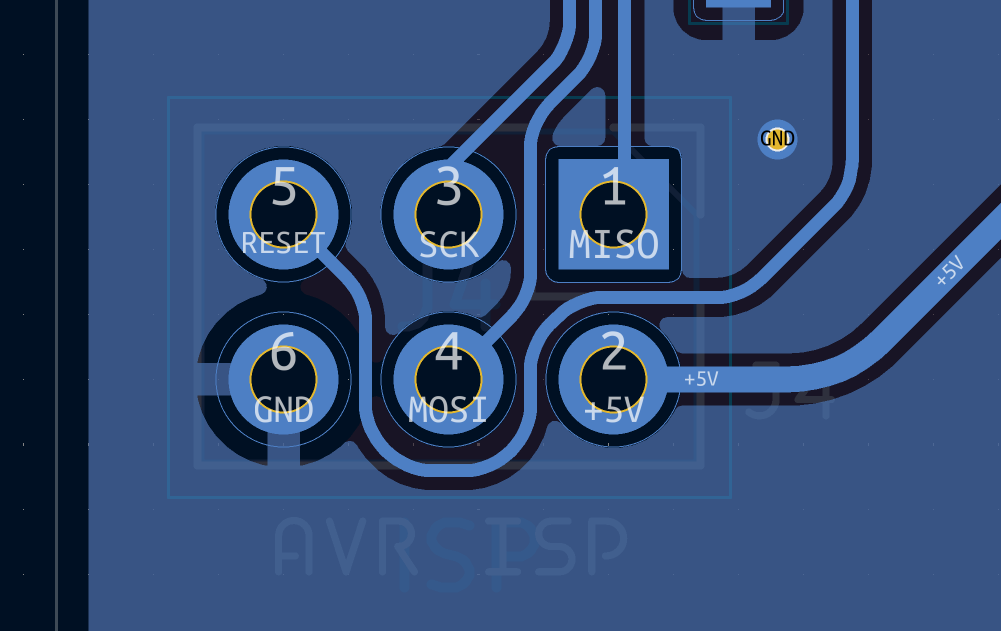
ISP Pin Note: The square pin connection is actually the MISO pin and not the ground pin due to an error in the silkscreen. See the diagram below for correct pin locations:
Keyboard Layout
The keyboard layout can be viewed and edited using:
- Keyboard Layout Editor - Import the
sandpiper-layout.jsonfile - KBFirmware - Use to verify wiring and compile firmware
A premade firmware layout file (sandpiperfirmwarelayout.json) is provided in the layout folder for convenience.
Enclosure
The enclosure is designed to be 3D printed:
- Recommended Material: PETG-strong (very unlikely to warp)
- Structure: One piece for top half, one piece for bottom half, plus side connection pieces
Note: Other materials might work but print at your own risk. There are no built-in measures in the design to avoid warping, so consider splitting the design manually if using warp-prone materials.
Final Assembly
After programming:
- Optionally, cut or remove the programming header pins once you're done, if you desire. The enclosure has a hole at the bottom plate to ensure the pins do not cause a problem.
Resources
- Sandpiper PCB Repository - PCB schematics, keyboard firmware, and enclosure files